Showing posts with label info. Show all posts

Blogspot ----> Wordpress

I'm publishing my blog on wordpress.com now because i have some problem with blogger such as hard to upload and publishing my post...kalo rajin mungkin post juga la sikit-sikit sini blogger tapi 'main' blog sya ini mindlessrant.wordpress.com

Nikon D40 dSLR


I'm not into reviewing this thing and i'm not that pro enough to review cameras or things as such but i'm interested in owning it because i googled so many cameras, digital cameras to be exact and i find this Nikon D40 very interesting. Why Nikon D40 you say? They all say that this is among the cheapest and good dSLR camera out there even though it is only 6 Megapixels and it is the best camera to start if you wanted to learn about dSLR and its setting on the shutter speed, aperture and such. I know this camera is already a few years old and there are much more better camera out there but looking on the price..the cheapest dSLR camera out there is around..maybe rm2000+ to rm3000+ (well actually i don't know the cheapest price..heheheh..just main teka saja la) and that's way out of my budget, i'm not that rich. Again there is so much good review on this camera and also not so good review but hey!! all i wanted is to learn how to take good picture and fiddle with the settings..hehehe. Here are some pictures of the camera and some key features;


Key features

  • 6 megapixel DX format CCD (1.5x FOV crop, as D50)
  • Nikon Image processing engine (as D80 / D200)
  • 3D Color Matrix Metering II, 420 pixel sensor (as D80 / D50)
  • New Multi-CAM530 three area AF sensor
  • ISO sensitivity range 200 - 1600 plus HI 1 (3200 equiv.)
  • Custom Auto ISO (selectable maximum ISO, minimum shutter speed)
  • 2.5 fps continuous shooting (as D50), unlimited in JPEG
  • No status LCD, new LCD monitor based status / settings screens
  • Help suggestions on LCD monitor (eg. scene too dark, try using flash)
  • Large 2.5" 230,000 pixel LCD monitor
  • Bigger viewfinder view (x0.8 magnification, 95% coverage)
  • Short shutter lag and viewfinder blackout
  • Support for SDHC (SD cards over 2 GB in capacity)
  • In-camera retouching
    • D-Lighting (shadow / highlight enhancement)
    • Red-eye reduction
    • Trimming
    • Monochrome
    • Filter effects
    • Small picture
    • Image overlay
  • USB 2.0 with PTP and Mass Storage device support
  • Very compact, light body (smaller, lighter than D50)
  • Improved menu user interface (as D80 / D200)
  • New EN-EL9 Lithium-Ion battery (7.2V, 1000 mAh)
  • New 'Version II' AF-S DX 18-55 mm kit lens
**Info is from dpreview.com
**just google it for more review :)

What i did with inkscape 1

Ini lagi yg saya buat guna inkscape time buring-buring dalam ofis..hehehe...design yg sama saja sumanya tapi banyak cara yg boleh di pakai..


Tenpo Ibun Ayakashi Ayashi


I saw this anime from Astro "Animax" channel...and from the so called
encore telecast of the anime it seems a very interesting anime ( i like action anime like naruto and such). So i downloaded all episode for this anime (thank goodness i have rapidshare account..hehehe). For a brief description i already link the main title to wiki. Anime ni macam anime-anime yg ada skarang ni la. Ada lawak dia, ada fight scenes, some of watak dia ada kaitan dengan sejarah Jepun. Even story dia pun dibuat semasa zaman Tokugawa, so ada a bit of history la kana kasi masuk-masuk. This anime consist of 25 episodes. Here are some of the cut scenes of the anime;


The Red Jumpsuit Apparatus - Lonely Road


Just now finished...cough..download..cough..this band new album titled Lonely Road. I haven't got the time hear it..busy bah..but their single "You Better Pray" is already out. Even the music video is out (MTV, Channel V) or you can always search it on youtube..
Ini antara komen-komen yg saya terbaca la dengan track list dia...
"With LONELY ROAD, RJA has created a diverse, stunning rock record that is a huge artistic step forward for the band. Led by the blistering first single, ‘You Better Pray,’ the album forces listeners to stand up and take notice. With songs ranging from the sprawling title track, evocative of Temple of the Dog to the gorgeous, almost do-wopinfluenced ‘Believe’ to the more signature, RJA-sounding ‘Pen and Paper,’ Lonely Road is an album that is certain to establish the band as one of the biggest rock bands in the world."

Track listing :

1. You Better Pray
2. No Spell
3. Pen and Paper
4. Represent
5. Pull Me Back
6. Step Right Up
7. Believe
8. Pleads and Postcards
9. Lonely Road
10. Senioritis
11. Godspeed


Artist: The Red Jumpsuit Apparatus
Title: Lonely Road
Label: Virgin
Genre: Rock

Release Date: 03.02.2009

Huawei E220+OpenSuse 11.0

Akhirnya ok juga celcom broadband saya ni...punya la sakit ati nda dapat surf in the past few weeks..Ok this time i'm going to show how to set your Huawei modem (the E220 model) on your OpenSuse 11.0

First you need to plug in your USB Huawei modem then wait for the led showing from blinking green to blinking blue (that means there's 3G signal). If the led shows green and doesn't turn to blue then that means only GPRS signal.

After that right click on the Network Manager (the green round like earth icon, if not connected to the internet the color is grey/white).



Then got to "New connection" and click the ttyUSB0 as shown in the pic below.
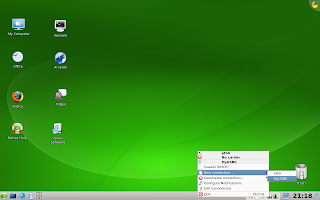


After clicking the ttyUSB0, it will show you this "Connections" window. Here you will create new connection for your Huawei modem.
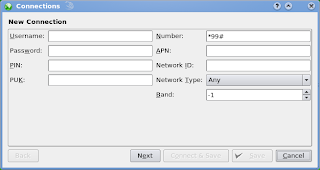

You need to change or add the "Number" from *99# to *99***16# (that is the celcom broadband dial number. All celcom broadband dials this number)
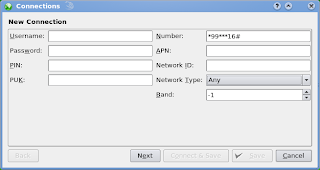

After that click "Next" (I didn't change much the next few setting). It's up to you if you want to add/change/edit the settings. I just leave as it is.
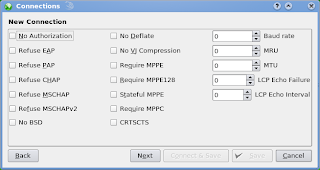
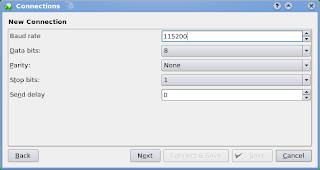
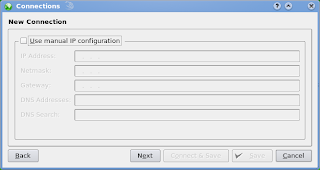
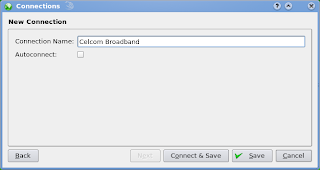


Well thats pretty much of it. After that click "Connect & Save" and you're ready to go. Try open Firefox and see if you can surf. Sometimes before surfing using Firefox you need to check the "Work Offline" on the File menu. You need to unchecked it first then you can continue to surf...I think thats all and good luck setting the Huawei modem on OpenSuse

*sorry for my bad english. kira broken la katakan, biasa la kalo malas blajar :P

Setting Up Proxies

Nowadays a lot of people are concerned about virus attack, spyware, identity thief and all sorts of annoying stuff but don’t be scared for you can hide your identity when surfing the internet without worry.
The easiest way for you to hide your computer is to use proxies. When your are connecting through a proxy, the server that you connect to will think you are connecting from the proxy computer. For instance, if you connect through a proxy in china while you are in malaysia, the web server that you connected through will think that you are connecting from china not from malaysia.
But on the down side of it, setting up proxies might slow down your websurfing. Thats because any document or file that you’re trying to download must go to the proxy server and then to your computer.
Next time, I will give details on setting up proxies on Microsoft Internet Explorer and Mozilla Firefox.
*This info is only for those who didn’t know how to set proxies. So for those who’s already know skip this part*
*Tell me if I’m wrong, ok*